

Features
One page. Every branch.
Everything customers ask.
A free page with your branches, hours and contact buttons. A shop, bookings and promotions come with paid plans as they roll out.
Your page
Get found in your parish, and show when you're open
One page on go2ja.com that answers the questions customers ask first.
Business page
FreeName, category, photos, contact links and reviews on one go2ja.com page.
Branches
FreeEach branch has its own address, phone and hours. Customers pick one and the page follows it.
Open now
FreeOpen, closing soon or closed, worked out from each branch's hours. Show today's hours before customers get in touch.
Search by parish
FreeShow up when people search by parish, category or "open now", across all 14 parishes.
Reviews
FreeCustomer reviews and your rating, on your page and in search results.
Private address
FreeWork from home? Hide the street address and still show up in your parish.
Contact
Receive enquiries at the right branch
Customers reach you directly. No middleman and no commission on enquiries.
WhatsApp, Call, Directions
FreeWhatsApp and Call show when you've saved a number. Directions show when customers can visit and the address is public.
The branch they chose
FreeEvery button follows the chosen branch, so Downtown gets Downtown's calls.
Ask about an item
FreeCustomers can open WhatsApp from your catalogue to ask about an item.
Shop
Showcase what you offer online in minutes
Start with a free catalogue, priced in J$. Turn on online ordering when you're ready.
Catalogue
FreeList items and services with photos and prices. Customers ask about them on WhatsApp.
Online ordering
Paid plansCustomers order from your page. You see each order in the dashboard. A separate switch from your catalogue.
Pickup at a branch
Paid plansCustomers choose which branch to collect from.
Items per branch
Add an item once and choose which branches offer it.
Delivery
LaterNot available yet. Arrange delivery with the customer on WhatsApp for now.
Pay online
LaterNot available yet. Customers pay you directly, the way they do today.
Bookings Paid plans · Rolling out
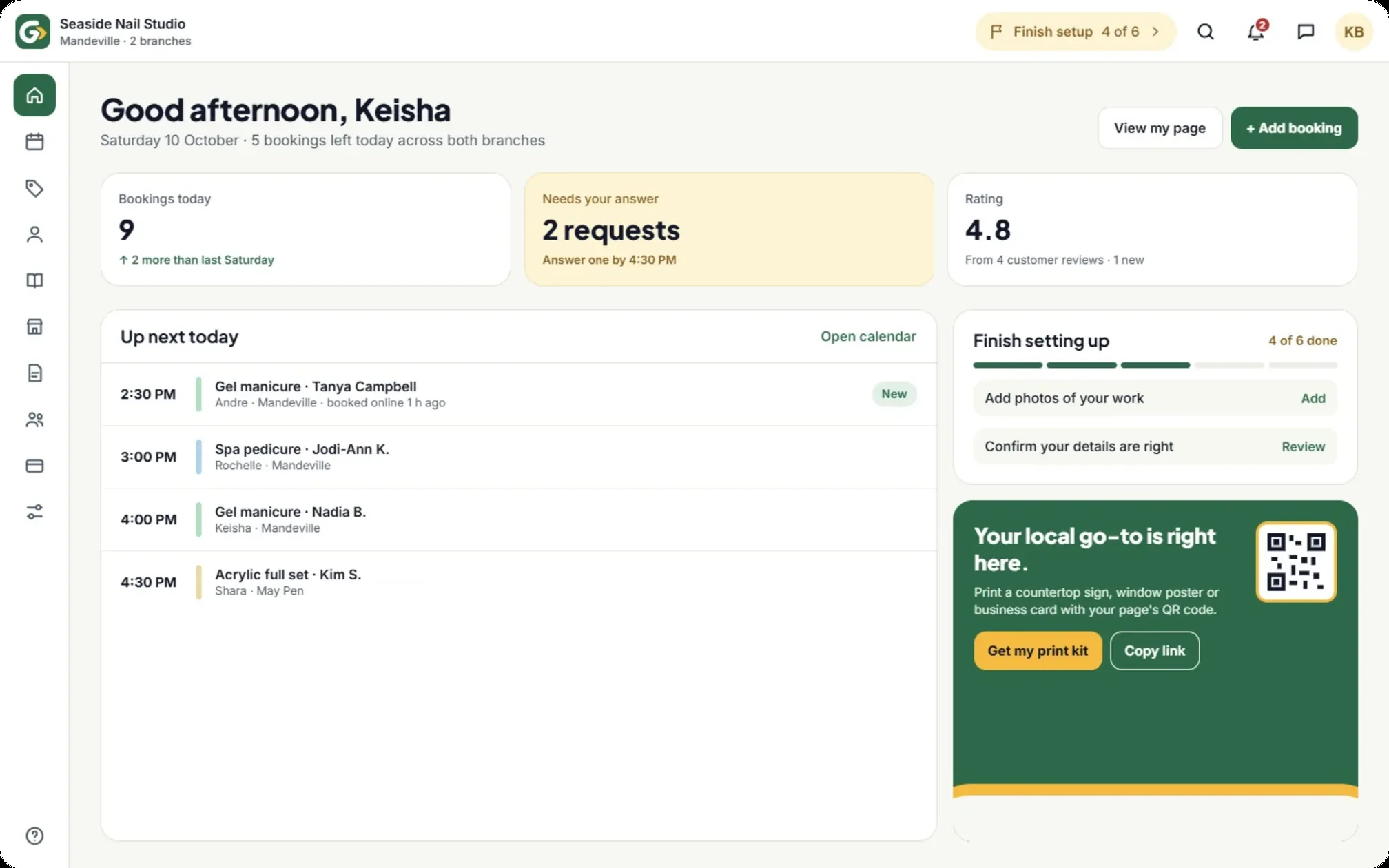
Review booking requests. Accept or decline.
Customers ask for a time from your page.
Booking requests
Customers pick a service, branch and time from your page.
Needs your answer
New requests wait on Home with the time to answer by.
Up next today
Today's bookings across every branch, in time order.
Deposits
LaterNeeds online payments, which aren't available yet.
Promotions Paid plans
Post a deal on your page. It ends on its own.
- Promotions and codes
- A percentage or J$ off, with an optional code to say at the counter or on WhatsApp.
- Start and end dates
- Set it up ahead of time. It comes off your page when it ends.
- Safe team editing
- If a teammate saves first, review their saved version before choosing how to continue.
Team
Bring your team in, branch by branch
- Invite by phone number
- They see your invitation when they sign in to the dashboard. It expires if it isn't used.
- Roles and permissions
- Choose who can edit the page, answer requests or only view.
- Per-branch access
- Staff see only the branches they work at. Remove access in one step.
Print kit · For published pages
From the counter to your page
Put your page's QR code on the counter. A scan opens your hours and contact buttons.
- Countertop card
- Window poster
- Sticker
- Business card

Setup and help Free
Need help on what to do next?
- Setup checklist
- Shows what's left before your page goes live.
Be the go-to in your parish.
Start with your business name and parish. Your page is free; paid plans add a shop, bookings and promotions as they roll out.
Jamaican-founded. Built for Jamaica.